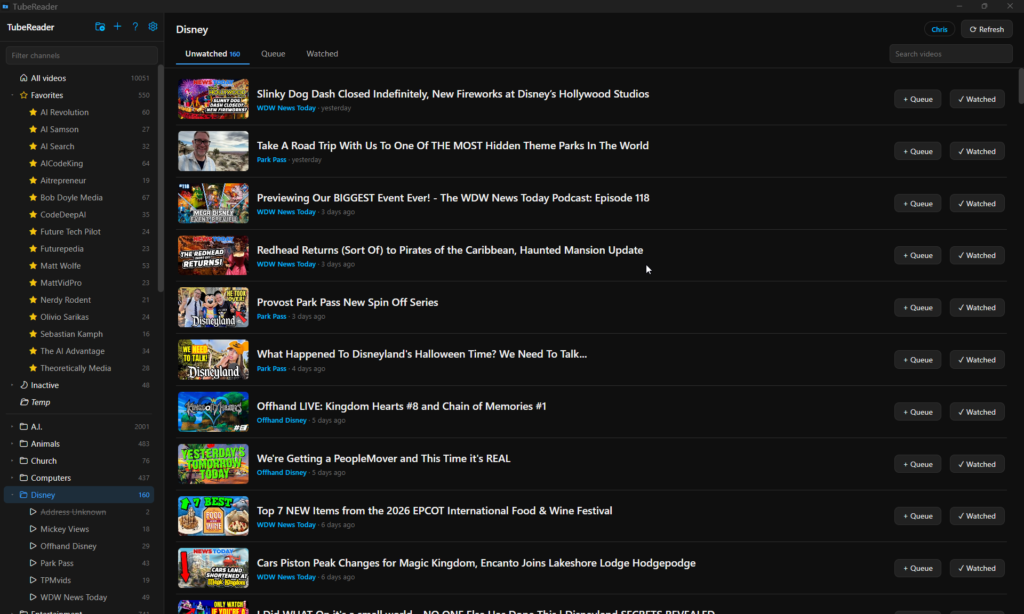
TubeReader main window: channels in folders on the left, unwatched videos on the right
$5, once

TubeReader

Every new video from the channels you choose. Nothing else.

YouTube’s homepage shows you what it wants you to watch. TubeReader is a small Windows app that shows you what you subscribed to, sorted into folders you arrange, marked watched as you go, with nothing recommended, ever.

$5 · 3.7 MB · Windows 10 & 11
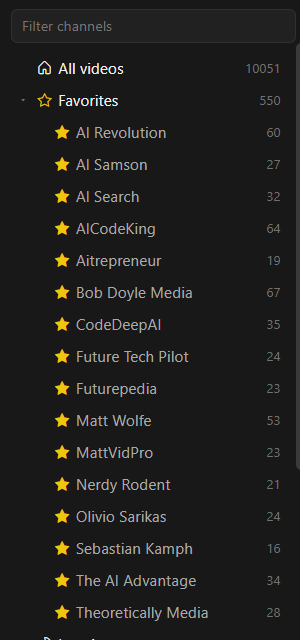
TubeReader sidebar with channels sorted into folders and subfolders

Folders, not an algorithm

In the mood for AI news? That’s a folder. Funny animal night? That’s a folder too. On YouTube, everything you subscribe to gets shuffled into one feed with everything it hopes you’ll click. Your channels are in there somewhere, but you do the hunting. In TubeReader, you sort your channels once, and every new video simply appears where you’d look for it.

It’s also the calmest YouTube a child can have. Give your kid their own user (two clicks) and fill their folders with only the channels you approve. That’s their whole world in TubeReader: no homepage, no recommendations, no rabbit holes. Just the channels you chose for them.

  • Add a channel by pasting any YouTube link, even a video or @handle
  • Star favorites; they stay in their folders too
  • Channels that go quiet are gathered under "Inactive"

A watch list that tends itself

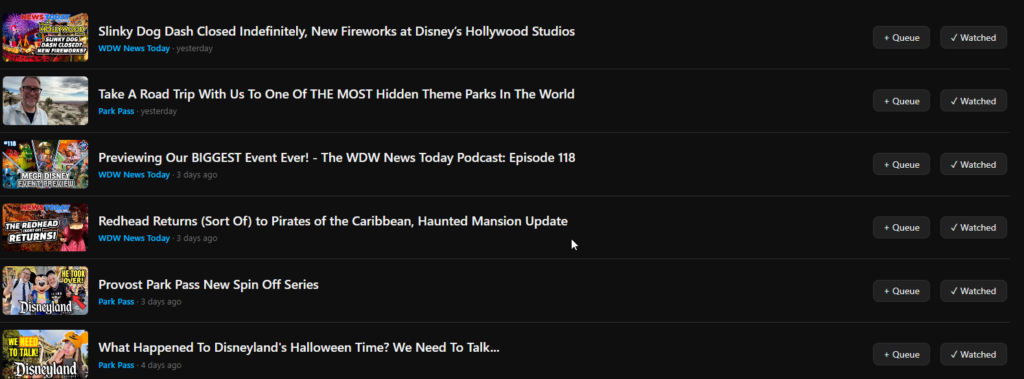
New videos land in Unwatched, newest first. Open one and it’s marked watched. Queue the good ones and TubeReader plays them back to back, asking politely before rolling the next.

  • Watch inside the app or in your browser, whichever you prefer
  • Search every video title in the current view
  • Checks for new videos on launch and every 20 minutes
TubeReader list of unwatched videos with Queue and Watched buttons
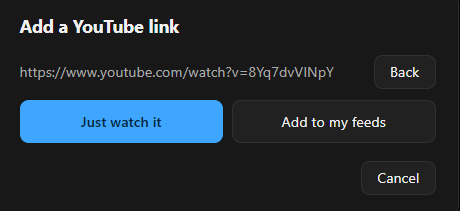
TubeReader add-a-link window offering Just watch it or Add to my feeds

One video, no strings

Someone sends you a link. You want to watch it in the calm player, not subscribe to a whole channel for one video. Paste the link into the + button, choose Just watch it, and it plays right away. Nothing is added to your folders, your queue, or your history.

  • Works with any video link: watch links, youtu.be, Shorts, live
  • The title and channel show in the player header
  • Pick Add to my feeds instead and it subscribes as usual

Right-click does the heavy lifting

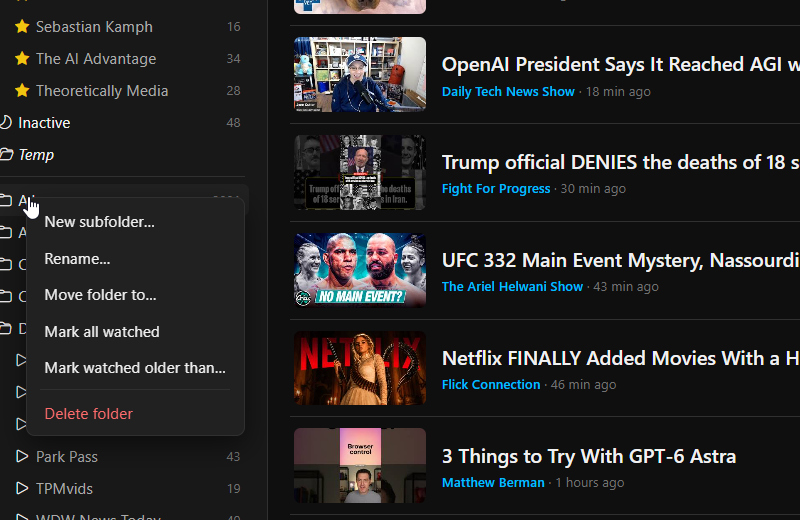
Everything about a channel is one right-click away: rename it, move it, star it, or clear a backlog with “mark watched older than a month.” Unsubscribed by accident? There’s a ten-second Undo.

  • Catch-up options: clear videos older than 1 week to 3 months
  • Rename any channel to whatever makes sense to you
  • Deleting a folder never deletes its channels
TubeReader right-click menu for a channel folder
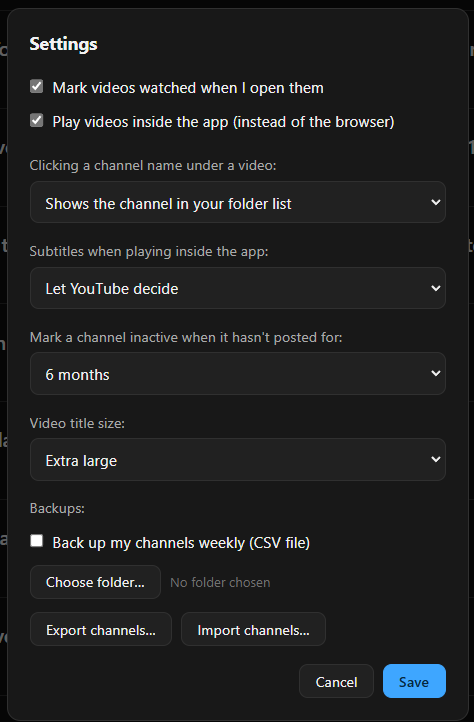
TubeReader settings window

Set it up your way, once

A handful of settings that actually matter: how videos open, whether subtitles show, how big titles are, and when a quiet channel counts as inactive. Turn on the weekly backup and TubeReader saves your channel list to a file every week, automatically.

  • Video titles from Small to Extra large
  • Separate users, each with their own channels and history, no passwords
  • Built-in help screen explains every feature

A quieter way to watch

TubeReader plays videos in YouTube’s own embedded player: the same clean, anonymous player you see on news sites and blogs. It doesn’t know who you are, and that anonymity changes everything about the experience: no recommendations pulling you sideways, no Shorts shelf, no algorithm learning your weaknesses. And because advertisers pay to reach known audiences, anonymous embedded viewing is currently a remarkably ad-light experience; most videos simply start playing.

No tricks, no ad-blocker, nothing to configure. That’s just how YouTube treats a viewer it can’t profile. (It’s YouTube’s player and YouTube’s rules, so we can’t promise forever, but we can promise TubeReader will always be the calmest way to work through your subscriptions.)

The player doesn't know you, and advertisers don't pay to interrupt strangers.

Your data never leaves your PC

TubeReader has no account, no cloud, and nothing to sign into. Your channels, folders, and watched history live in one small file on your own computer, and only YouTube is ever contacted, just to fetch your channels’ public feeds.

  • No account, ever. Install it and it works.
  • One-file backup. Export your channels to a CSV file any spreadsheet can open, or let the weekly auto-backup do it.
  • Easy moves. Import that file on a new PC and your folders rebuild themselves.

Why I made this

I was tired of fighting YouTube to find the channels I actually wanted to watch. So I built TubeReader for myself: my channels, in my folders, nothing else. I’ve used it every day since, sanding off the rough edges version by version, and it finally feels ready to share. If it makes your watching calmer too, that’s the whole point.

— Christopher

A great app at a fair price. $5, pay once, no subscription.

The complete app for one small price: nothing locked, no trial, no subscription. Buy it once, and new versions come to you through Gumroad at no extra charge.

Version 1.5.3 · 3.7 MB · Windows 10 & 11

Questions

It’s wonderful for it, with an honest caveat. Give your child their own user, fill their folders with only the channels you approve of, and their whole TubeReader world is those channels’ videos: no homepage, no recommendations, no Shorts. The honest caveat: TubeReader curates what’s in the list, but it isn’t a parental lock: videos still play through YouTube’s player, and there are no passwords on users. For younger kids it works best as “the YouTube we watch together.”

That notice appears because TubeReader comes from an independent developer rather than a big company that pays for code-signing certificates; Windows shows it for most small apps. Click More info, then Run anyway. The installer is 3.7 MB and installs only TubeReader. No bundled extras, no toolbars.

$5, once. No subscription, nothing locked, no trial. You buy it on Gumroad, and new versions show up in your Gumroad library at no extra charge.

No. TubeReader reads the public video feed that YouTube publishes for every channel. You never sign in to anything, and nothing you watch is reported anywhere.

You add channels by pasting YouTube links, or by importing a CSV file (a simple spreadsheet with a column for the channel name and one for its link; folders come along when the file names them). Moving to a new PC works the same way: export, copy, import.

No. TubeReader reads the public feed YouTube publishes for every channel, without any login; that’s what makes it private and account-free. Members-only videos aren’t in that public feed, so they won’t appear in your list. Your membership still works as always on YouTube itself; think of TubeReader as covering everything channels post publicly.

No. TubeReader is a Windows desktop app, for Windows 10 and 11. That focus is part of why the whole thing is 3.7 MB.

Download the new installer and run it. It upgrades in place, and your channels, folders, and watched history are untouched.

TubeReader 1.5.3 · an independent Windows app · not affiliated with YouTube

Scroll to Top